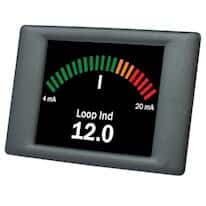
Display connects to a PC via USB port for customization of color, units, logo, and graphical or numerical representation of measurements
Free PanelPilot software download is compatible with Windows® XP, 2000, Vista, and Windows 7
Panel mount with the included hardware, or leave free standing
Screw terminal connections for scaleable 4 to 20 mA sensor input
1 year warranty
More About this Item
These versatile color TFT graphic meter displays are user-programmable to show a variety of styles previously supported by traditional panel meters. Easily configure with the free PanelPilot software to display information through bar graph, analog, or numeric meter styles with user-defined color, text, units, and input scaling. A library of predefined elements such as meters, buttons, and switches is constantly being updated and expanded. USB to micro-USB cable is required for PC connection and programming. A standard null-modem cable will not power the unit as well as transfer data for programming, please order the 18000-58 interface cable (not included). Once programmed, the display can be left connected to a PC and powered through the USB port, or disconnected and powered through the 4 to 30 VDC terminal and mounted where needed. A USB to AC power adapter (part number 18000-59) is also available so you may plug the meter into a standard North American wall outlet.
Configuring your PanelPilot display is simple; just follow these five easy steps:
1. Download the PanelPilot software (see zip file in the Technical Resources section) 2. Connect your display to the USB port of your PC using cable 18000-58 (must be purchased separately, please see Accessories section) 3. Customize by selecting from an ever-increasing library of configurations 4. Test your setup on the software before uploading the to your display. 5. Upload the configuration to your meter, and use in your application!
Specifications
Control Input mA4-20
Display Type2.4" color touchscreen
Max Power VDC (VDC)30
Min Power VDC (VDC)4
DescriptionPanelPilot 2.4" Graphic Panel Meter; 4-20 mA Input